Install Ambari 3.1.0
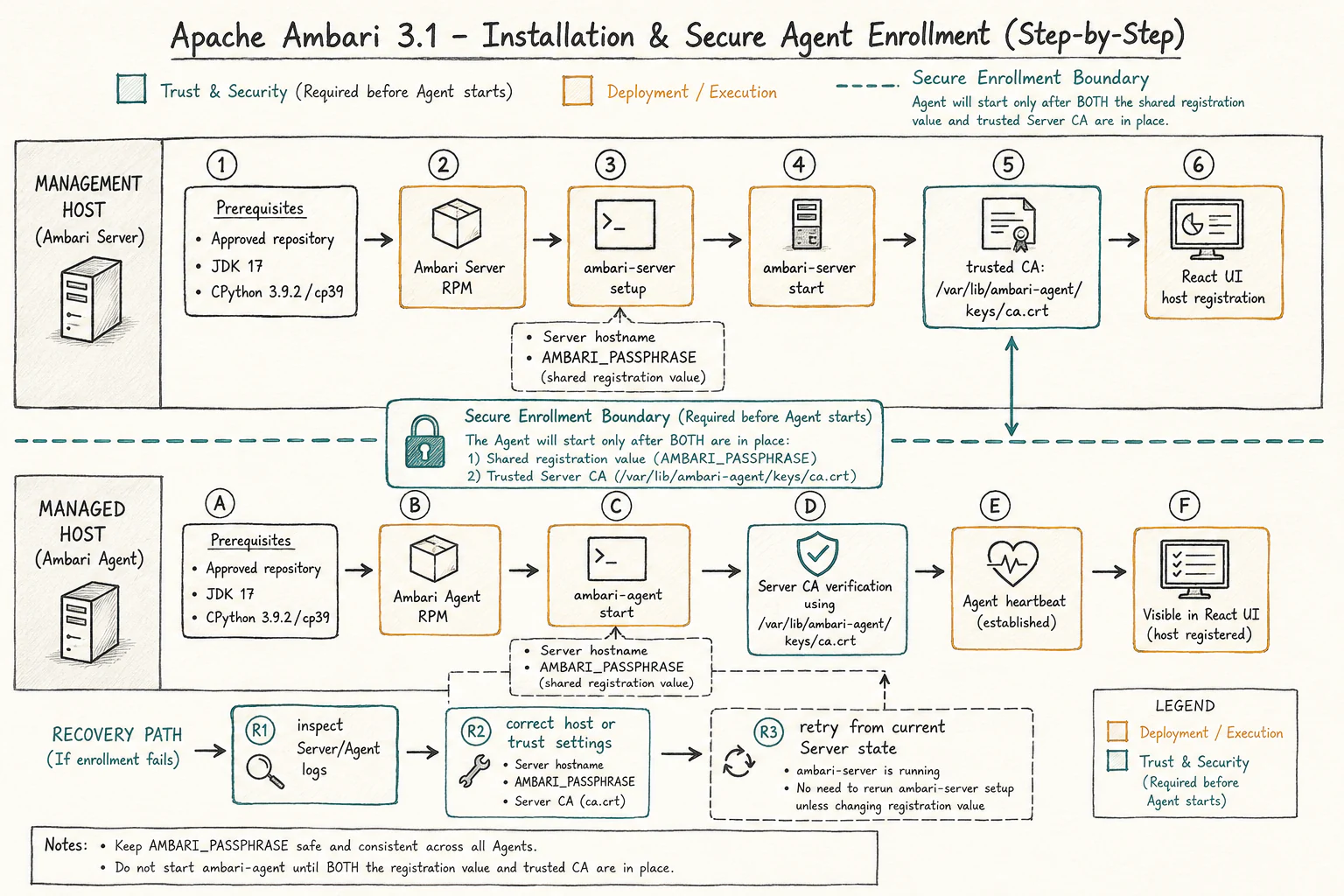
This procedure is for a reviewed 3.1.0 candidate or RPMs built from the reviewed source. Confirm the artifact, OS, architecture, and repository with your administrator before installing. Do not treat an unreviewed candidate as a production release.
Prepare Hosts
Install the supported candidate OS packages from your operating-system and
approved Ambari repositories. The default RPM/Python target is Linux x86_64,
CPython 3.9.2+, ABI cp39; Rocky Linux 8 uses AppStream python39. Ensure
every host resolves the selected hostname and can reach the Server and database
according to the network policy. Do not disable the firewall or SELinux as a
production workaround.
Install JDK 17 for Ambari Server and Agent helpers. Select the JDK for Hadoop and other Stack services separately; Ambari does not silently replace that choice. For the default cp39 RPM target, check the runtime tools:
java -version
/usr/bin/python3.9 --version
On Rocky 8, use the package's supported python39 interpreter rather than
assuming generic python3 selects Python 3.9. Maven and Node/npm are build-host
tools, not prerequisites on every runtime host. Do not run runtime pip install.
Install Packages
Install Server on the management host and Agent on every managed host from the same reviewed repository or candidate package set. Use the native package manager and retain the repository metadata required for dependency resolution. On Rocky/RHEL, use the repository-aware package manager to resolve dependencies. Run the Server command only on the management host and the Agent command on managed hosts. The file paths below refer to reviewed local candidate RPMs:
sudo dnf install /path/to/ambari-server-*.rpm
sudo dnf install /path/to/ambari-agent-*.rpm
The RPM installs Ambari's private Python dependencies and ABI wrapper. Do not overlay an older private library directory, and do not substitute an unrelated system package for a bundled native extension.
Configure The Database
Create an empty Ambari metadata database and service account using the database administrator's reviewed procedure. Keep the database host, port, name, user, and password out of shell history and documentation. Then use the installed Server setup flow to write the selected database configuration:
sudo ambari-server setup
Answer the prompts for the database type and connection details. The command also supports the separate Java homes used by the candidate:
sudo ambari-server setup \
  --ambari-java-home /opt/jdks/ambari-17 \
  --stack-java-home /opt/jdks/stack-java
Use real installed paths; the example does not create JDKs. Review the generated configuration and backup it before starting the service.
Start And Enroll Agents
Start Server, then configure each Agent's Server hostname and trust material using the approved enrollment process. The candidate requires a pre-established Server CA; an Agent must fail closed when the CA is missing or does not verify. Never use a default enrollment passphrase or commit a private key.
The Installer/Add Host bootstrap supplies the expected host identity, Server
hostname, run-as user, bootstrap port, enrollment passphrase, and trusted CA.
For preinstalled Agents, provision the same trust/configuration before starting:
the Server hostname is written into Agent configuration, the enrollment value
is stored as AMBARI_PASSPHRASE in /var/lib/ambari-agent/ambari-env.sh, and the
trusted Server CA is installed at /var/lib/ambari-agent/keys/ca.crt. Protect
the environment file and transfer the CA through a trusted channel. Do not put
the passphrase into an interactive command line or fetch trust from an
unverified endpoint. These paths are defined by the pinned
bootstrap implementation.
sudo ambari-server start
sudo ambari-agent start
Confirm host registration, heartbeat, and a controlled command from the React interface before installing a Stack. If bootstrap fails, inspect the Server and Agent logs, correct the host or trust configuration, and retry after rereading the host state; do not manually delete database rows.
Install Monitoring Separately
If monitoring is required, install the reviewed ambari-metrics RPM and deploy
VictoriaMetrics and VMAGENT according to the matching monitoring procedure.
The Agent exposes /metrics and component routes; VMAGENT discovers and
scrapes them and remote-writes samples to VictoriaMetrics. The React client
queries through Ambari's protected metrics proxy, not a browser-side legacy AMS
endpoint. Validate exporter health, target discovery, storage delivery, and
datasource access before relying on dashboards.
Verify Installation
Check that Server and Agents run with the intended JDK/Python ABI, that the metadata database is reachable, and that a service check succeeds. Record the candidate revision and all environment-specific results. This guide does not claim that these checks were run here.
See Quick start guide, Python runtime, and Planning the upgrade.