React User Guide
Primary UI
Ambari 3.1 uses the React application in ambari-web/latest as its primary Web UI. It retains the Ambari shell, authentication, routing, authorization, service context, and the main operational workflows previously provided by the Ember application.
The primary React experience covers cluster installation, Hosts, Services, configuration editing, background operations, Alerts, Kerberos, high availability, upgrades, administration, Views, service Themes, and permission/feature-flag gates. These workflows are implemented in the current React tree, but acceptance still depends on the Ambari Server, stack, topology, and user role being tested.
Opening Ambari
Open the Ambari Web base URL normally. The 3.1 bootstrap uses the primary React entry point /latest/#.
React is selected by default when no browser preference exists. An older browser preference may be migrated to the primary React entry point when required by the deployment. The bootstrap behavior is implemented in ambari-web/public/index.html.
The historical Ember application is referenced only for migration comparison; it is not a 3.1 operating path described by this guide.
Multi-cluster Navigation
Cluster operations use /clusters/:clusterName/main/* inside the React hash route. The global /clusters and /services directories show authorized clusters and deployments; selecting a row establishes its owning cluster in the URL. Separate tabs retain independent context. Unscoped legacy links resolve through an authorized cluster selection, not an arbitrary first cluster.
See Creating and Using Clusters for installation, saved-draft recovery, Admin management and concrete URLs. Managed HBase Dependencies explains provider selection and readiness; Operations and Recovery covers exact request identity and retry.
Workflow Coverage
Installation and Hosts
The Installer and Add Host flows guide stack selection, host registration, bootstrap, component assignment, configuration groups, installation, and request progress. Hosts supports paging, sorting, filters, selection, component actions, maintenance, decommission/recommission, logs, alerts, stack versions, and Add Host recovery.
Host selection is retained across navigation and refresh. Selected hosts are mirrored in local browser state, while Hosts-module filters are reset when leaving the Hosts pages. Recent changes also correct Host Summary component loading when opened from the Hosts List.
Services and Configurations
Service pages provide summaries, component state, actions, quick links, configuration groups, overrides, validation, recommendations, and read-only behavior. Services with supported dashboards expose a Metrics tab. Configuration saves preserve the full default-group property set and report validation or request failures.
Capacity Scheduler editing uses a combined capacity-scheduler.xml key/value editor. After a successful change, Ambari can prompt the user to refresh YARN queues and submits the refresh action to the ResourceManager.
Background Operations and Alerts
Background Operations combines request snapshots, realtime updates, task and host details, logs, filters, progress, failure states, retry actions, and Request Schedule status. Polling is serialized and scheduled requests are kept distinct from ordinary request IDs.
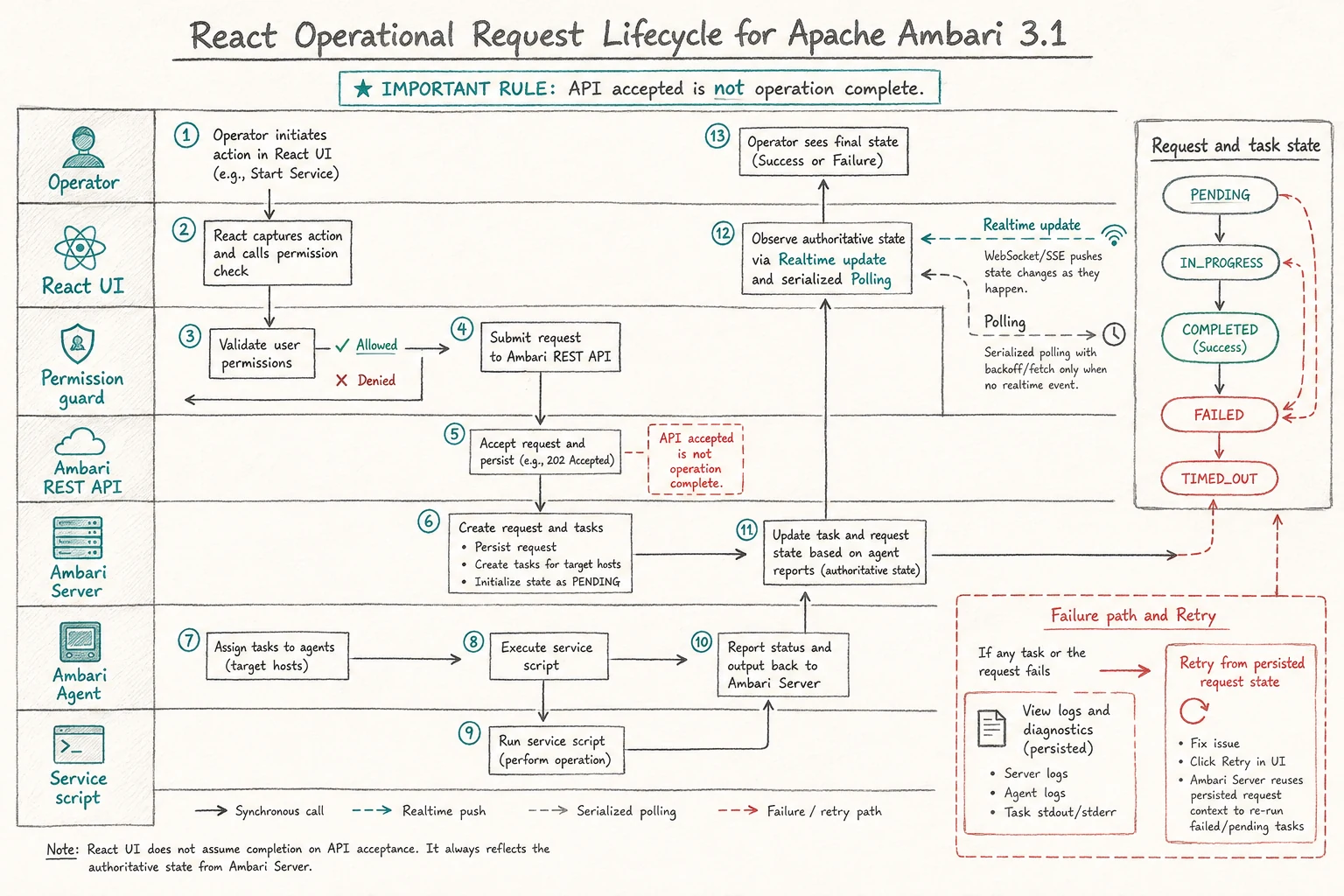
An accepted API request is only the start of an operation. React follows the authoritative request and task state persisted by Ambari Server until success or failure.
Alerts provides list, detail, create, edit, delete, grouping, authorization, polling, and failure feedback. Metric alert definitions and legacy Metrics data are outside the non-Metrics parity boundary.
HA, Kerberos, and Upgrades
The React workflows cover NameNode/JournalNode HA, ResourceManager HA, Ranger Admin HA, federation, and the related installation, KDC credential, persistence, request progress, retry, and ownership paths. Kerberos supports descriptor/configuration, credential gates, service installation, and recovery checkpoints.
Stack administration includes version lists, repository information, upgrade and downgrade start flows, prechecks, progress, pause/resume, history, service accounts, and auto-start controls. Upgrade and HA workflows use persisted checkpoints and owner guards where required.
Views and Themes
Views are listed from the authenticated React shell and opened in their server-provided same-origin iframe context. View-only users receive a reduced shell and can navigate directly to Views. Ambari Admin is a separate React module under ambari-admin/src/main/resources/ui/ambari-admin; its packaged React latest output is built alongside the main UI.
For a complete View extension workflow, including a path-safe React frontend, JAX-RS resources, permissions, packaging, and deployment, see Developing React Views.
Service Themes provide stack-defined layouts, configuration widgets, attributes, conditions, recommendations, and read-only/permission handling. Theme parsing and representative consumers exist, while exhaustive custom-stack and round-trip combinations remain acceptance work.
Native Monitoring
React includes a native Prometheus-compatible monitoring area at /main/monitoring. It provides datasource management, PromQL exploration, dashboards, dashboard editing/import/export/clone, scrape targets, shared charts, and datasource-backed cluster and service dashboards. See Queries and Dashboards.
Monitoring routes use CLUSTER.VIEW_METRICS for cluster queries, dashboards, explorers, and datasources; HOST.VIEW_METRICS for scrape targets; SERVICE.VIEW_METRICS for service Metrics tabs; and independent mutation guards for datasource and dashboard changes.
The former standalone dashboard Heatmaps route redirects to /main/dashboard/metrics. This is an intentional replacement boundary: React does not provide AMS or Ganglia compatibility paths, and the migration does not claim legacy Heatmaps or AMS/Ganglia behavior as unfinished React work.
Workspace Navigation And Appearance
The AMBARI-26663 development follow-up adds grouped management-pack service selection, prominent global navigation, return to the previous cluster page, persistent light/dark/system appearance, compact host alert links, and clearer monitoring interactions. These capabilities require the corresponding implementation rather than only the earlier React baseline.
See Workspace Navigation and Appearance for visible entry points and state boundaries, and the store walkthrough for importing and deploying selected services.
Build and Deployment
The Maven ambari-web module builds the primary React application from ambari-web/latest with the configured Node/npm toolchain and writes latest/dist; the Maven package copies that output into the server Web UI artifact. The separate ambari-admin module builds its Admin React application from src/main/resources/ui/ambari-admin and packages its output under classes/latest.
See Customizing The React UI for the source map, route and API conventions, test commands, Server artifact build, and a development-only static file replacement procedure.
For upgrade and administration procedures, see the Upgrade Guide. A deployed build should be checked with the same base path, proxy context, and authentication mode used by the target Ambari installation.
Acceptance Checklist
The following describes the evidence boundary for this guide:
- Implemented workflows: React routes, screens, API clients, permission guards, focused unit tests, and the documented fallback/empty/error states exist for the domains above.
- Real-stack validation: install, upgrade, service actions, HA/Kerberos, Views, Themes, Prometheus datasource connectivity, target health, and dashboard queries require a real Ambari Server and representative stack/topology.
- Role validation: direct URLs, read-only users, mutation permissions, View-only users, cluster isolation, and Admin View transitions require representative authorization responses.
- Recovery validation: browser refresh, session expiry, SSO, server restart, request failure, retry, stale responses, polling teardown, and persisted workflow ownership require browser/server execution.
- Source references: the React audit uses PR4182 head
4e95d2e3and merged trunk94c6389a96as code evidence. These references establish implementation provenance, not blanket runtime validation.