Migrate From AMS
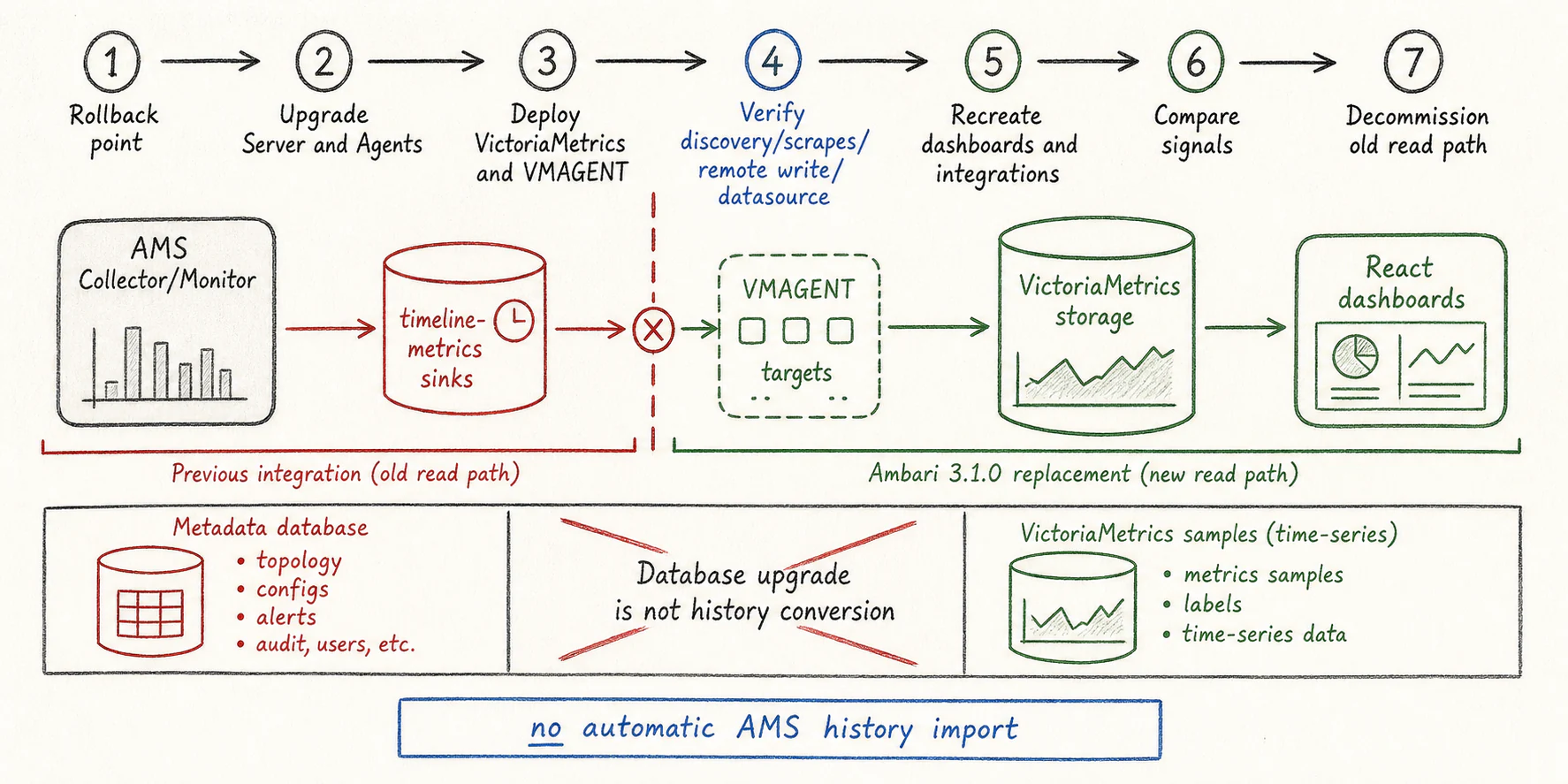
| Previous integration | 3.1.0 replacement or action |
|---|---|
| AMS Collector/Monitor and timeline-metrics sinks | Agent telemetry endpoints, VMAGENT scraping, and VictoriaMetrics storage |
AMS monitoring metrics.json definitions | telemetry.json plus typed JMX profiles |
| Old monitoring Widget/WidgetLayout APIs | React Board/Dashboard/Datasource workflows |
| AMS/Ganglia metric names and custom widget queries | Map the required signals to the new exported inventory and rewrite queries |
| Legacy Heatmaps page | Native monitoring dashboards; the previous route redirects to Metrics |
| Categraf/Telegraf dashboard templates | Use native Ambari dashboards or adapt queries; their aliases are not emitted |
| Custom service telemetry | Implement the service integration contract and verify real output |
Not everything containing the word metrics or widget is removed. Direct JMX management values, JMX alerts, Hadoop YARN Timeline Service, and service Theme form controls remain distinct supported features.
Database Upgrade Is Not History Conversion
The 3.0.0-to-3.1.0 catalog creates the datasource, board, board_payload, and chart_share persistence model and its sequences/constraints. These records describe monitoring configuration and dashboards, not the time-series samples stored in VictoriaMetrics.
The catalog is not a converter for AMS historical samples or legacy widget layouts. Do not infer data conversion, archival, or deletion of every legacy table from the new table names. Back up the database and validate the actual schema upgrade using the release candidate being installed.
Cutover Sequence
- Establish a rollback point for Server, Agents, configuration, and the database. Export the legacy monitoring definitions needed for reconstruction.
- Verify the runtime and package prerequisites in the platform guides.
- Upgrade Server and Agents through the supported Ambari upgrade process for the candidate. Do not reuse a 3.0 package set with only a new React asset bundle.
- Deploy the target VictoriaMetrics topology and VMAGENT using the managed service procedure.
- Verify HTTP discovery, host/component scrape results, remote-write delivery, datasource access, and the packaged dashboards.
- Recreate custom dashboards and integrations with the new metric names, types, units, and authoritative cluster labels.
- Compare representative signals and failure scenarios before decommissioning the old read path. Record the monitoring gap and new retention start time.
The new Ambari monitoring runtime does not maintain AMS as a parallel supported backend. Any temporary legacy archive or external read service is a separately planned operational arrangement.
Custom Metrics And Dashboards
A similarly named metric is not necessarily equivalent. Check units, counter-versus-gauge semantics, label sets, HA role filtering, missing-value behavior, and collection frequency. Use a bounded label inventory rather than copying process IDs, command lines, arbitrary object names, or user names into time-series labels.
Start custom dashboards from verified PromQL queries in the Explorer. Keep cluster isolation and ambari_target="host" on host queries. Validate active/standby service behavior, not only a single healthy node.
Rollback And Acceptance
Downgrading RPM files alone is not a complete rollback of a database and monitoring-model change. Rehearse a consistent database/configuration/package restore. Keep the VictoriaMetrics data and VMAGENT queue lifecycles separate from the Ambari metadata database.
Acceptance should include Server/Agent restart, missed assignment recovery, an unavailable component endpoint, invalid datasource credentials, temporary storage unavailability, queue recovery, and read-only users. A working dashboard screenshot proves only the captured scenario.
Implementation References
The migration boundary is described in the pinned telemetry architecture. The actual schema operations are in UpgradeCatalog310.