Edit Configuration Files
You can edit a service's configuration files in Ambari, including options that do not have a separate form field. For example, edit Nginx's configuration as a whole file, or add a Kyuubi setting without waiting for a new input box.
Where Do I Edit Them?
Open the service, then Configs → Configuration Files. Choose the file you want to change and edit its text. Use Basic Settings for items such as installation paths, connection details, and passwords.
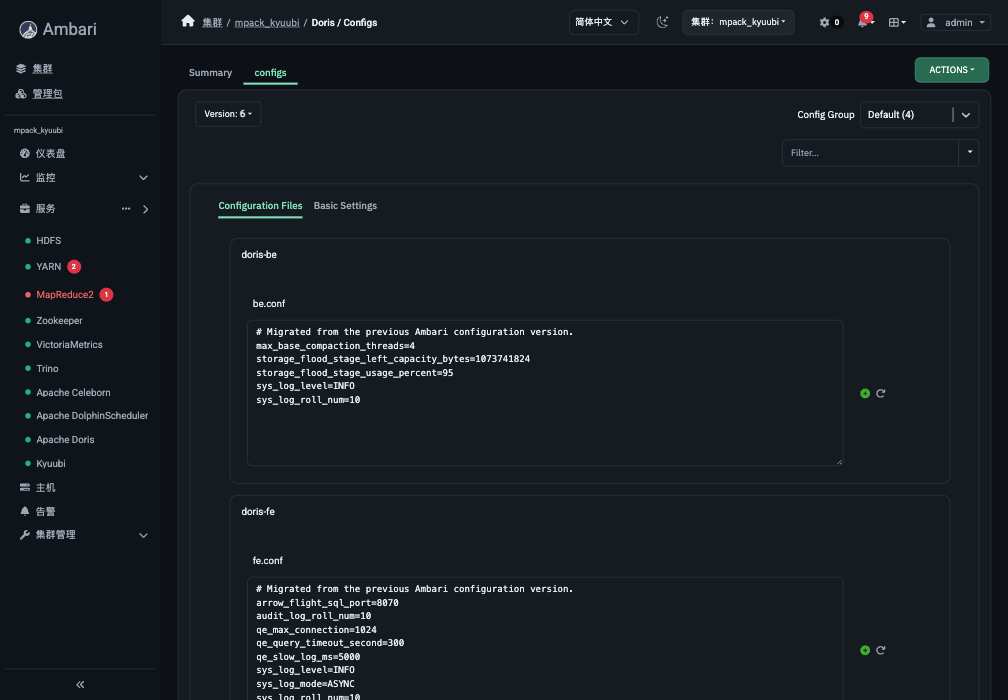
The editor is a multiline text field. It does not check every setting supported by every application.
| Service | Examples of editable files |
|---|---|
| PostgreSQL | postgresql.conf, pg_hba.conf, pg_ident.conf |
| Nginx | nginx.conf |
| Kyuubi | kyuubi-defaults.conf, environment settings, log4j2.properties |
| Trino | config.properties, node.properties, log.properties, jvm.config, catalog files |
| Doris | fe.conf, be.conf |
| Elasticsearch | elasticsearch.yml, JVM options, log4j2.properties |
| MinIO | minio.env |
| Airflow | airflow.cfg, webserver_config.py |
| Celeborn | celeborn-defaults.conf, environment settings, log4j2.properties |
| DolphinScheduler | Each role's application.properties, common.properties, logging and JVM settings |
Change, Save, And Apply
- Confirm that you are editing the right service and configuration group.
- Make your change in the file. Keep the existing template placeholders and required includes.
- Save, with a short note explaining why you changed it.
- Follow the restart prompt, or use the service's reload command if it supports one.
- Check the task result and run the service check.
Saved does not mean applied. Ambari has saved a configuration version; the running service still needs to load it.
When changing a configuration group, remember that a full-file override replaces the whole file for that group, not just one line.
Keep The Supplied Placeholders
Some values come from Basic Settings, such as ports, installation paths, and data directories. The file may contain placeholders for them. Keep those placeholders unless the service's instructions tell you otherwise; conflicting settings may prevent the service from starting.
Use the application's normal file format. Environment files accept variable assignments; they are not a place to add arbitrary shell commands.
What About An Existing Installation?
If the service already has a saved full configuration file, updating the service package does not replace your edits with new defaults. New upstream options can be added to your existing file.
For some older configurations, the page can prepare a file from the saved form values. Review it before saving. Password fields and configuration-group overrides need separate handling; they are not all converted automatically.
Older Nginx or PostgreSQL installations may have configuration changes made directly on the host. Ambari does not automatically read those files back into the editor. Compare them with the proposed configuration before saving and applying it.
Example: Add An Nginx Location
Inside an existing server block, add:
location /docs-check {
    return 200 "managed configuration\n";
}
Keep the rest of the file, including the supplied health-check include under conf.d. Save, then run the component's RELOAD command if it is available. Open the service address with the new path and check the response.
The package checks the candidate with nginx -t before replacing the main configuration. If it fails, open the task details and correct the file rather than restarting repeatedly.
Example: Change PostgreSQL Memory Settings
Find the existing setting and change it, rather than adding conflicting duplicates:
work_mem = '8MB'
Save and apply the required restart. Then connect to PostgreSQL and verify:
SHOW work_mem;
Keep the supplied path and port placeholders, as well as local management access rules. Changing a data-directory setting does not move the existing database.
If A Change Fails
Open the failed task and identify the file or setting it reports. Correct the configuration, save another version, and apply it again. If you need to go back, use the previous known-good configuration as the starting point and check the task result.
Nginx and PostgreSQL validate files before replacement and retain the previous files for recovery. This helps recover from a failed configuration change, but does not restore database data or undo a data migration.
For installation failures or interrupted store actions, see common problems and updates.