How-To Define Stacks and 服务
Ambari 管理的服务定义在其 stacks 文件夹中。
要定义由 Ambari 管理的服务和堆栈,请按以下步骤操作。
还可以参考创建自定义堆栈和服务的示例。
堆栈是服务的集合。可以定义一个堆栈的多个版本,每个版本都有自己的一组服务。Ambari 中的堆栈定义在 ambari-server/src/main/resources/stacks ; 文件夹中,安装后可在 /var/lib/ambari-server/resources/stacks 文件夹中找到。
由堆栈管理的服务可以定义在 ambari-server/src/main/resources/common-services 或 ambari-server/src/main/resources/stacks 文件夹中。安装后,这些文件夹分别位于 /var/lib/ambari-server/resources/common-services 和 /var/lib/ambari-server/resources/stacks。
问题:何时应在 common-services 文件夹而不是 stacks 文件夹中定义服务? 如果服务可能被多个堆栈使用,应在 common-services 文件夹中定义。例如,几乎所有堆栈都需要 HDFS 服务,因此无需在每个堆栈中重新定义 HDFS,而是引用 common-services 中的定义。同样,如果服务不会被共享,则可以在 stacks 文件夹中定义。基本上,stacks 文件夹中定义的服务通过包含使用,而 common-services 中定义的服务通过引用使用。
Define 服务
下面展示如何在 common-services 文件夹中定义服务。在 stacks 文件夹中定义服务时也可以采用相同方法,相关内容将在 Define Stack 部分讨论。
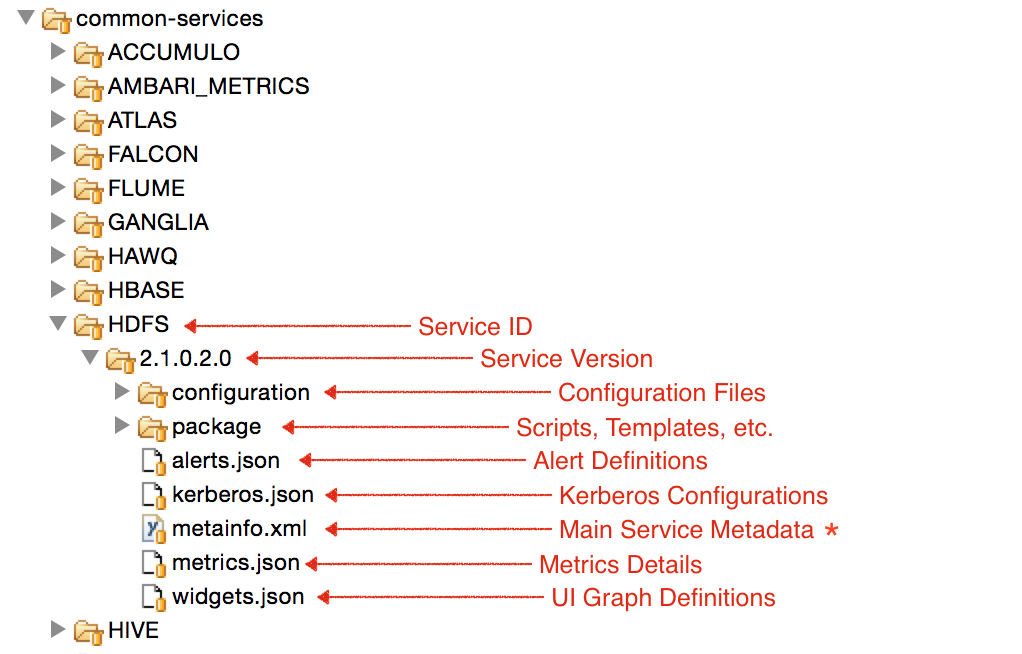
服务必须提供主 metainfo.xml 文件,其中包含服务的重要元数据。
除此之外,还可以提供其他文件来补充服务信息。下面将详细介绍这些文件。
服务还可以从先前的堆栈版本或通用服务继承。有关更多信息,请参阅 Service Inheritance 页面。
metainfo.xml
在 metainfo.xml 服务描述符中,首先可以定义服务及其组件。
完整参考请参阅 Writing metainfo.xml 页面。
HDFS metainfo.xml 是一个很好的参考实现。
问题:是否可以在同一个 metainfo.xml 中定义多个服务? 可以。虽然这是可行的,但不建议在同一个服务文件夹中定义多个服务。
YARN 和 MapReduce2 是在 YARN 文件夹中一起定义的服务。其 metainfo.xml 定义了这两个服务。
Scripts
定义组件后,需要提供能够处理服务和组件生命周期各个阶段的脚本。
管理服务和组件所需的脚本在 metainfo.xml 中指定(HDFS)。每个脚本都应扩展提供实用方法的 Script 类。例如:NameNode 脚本
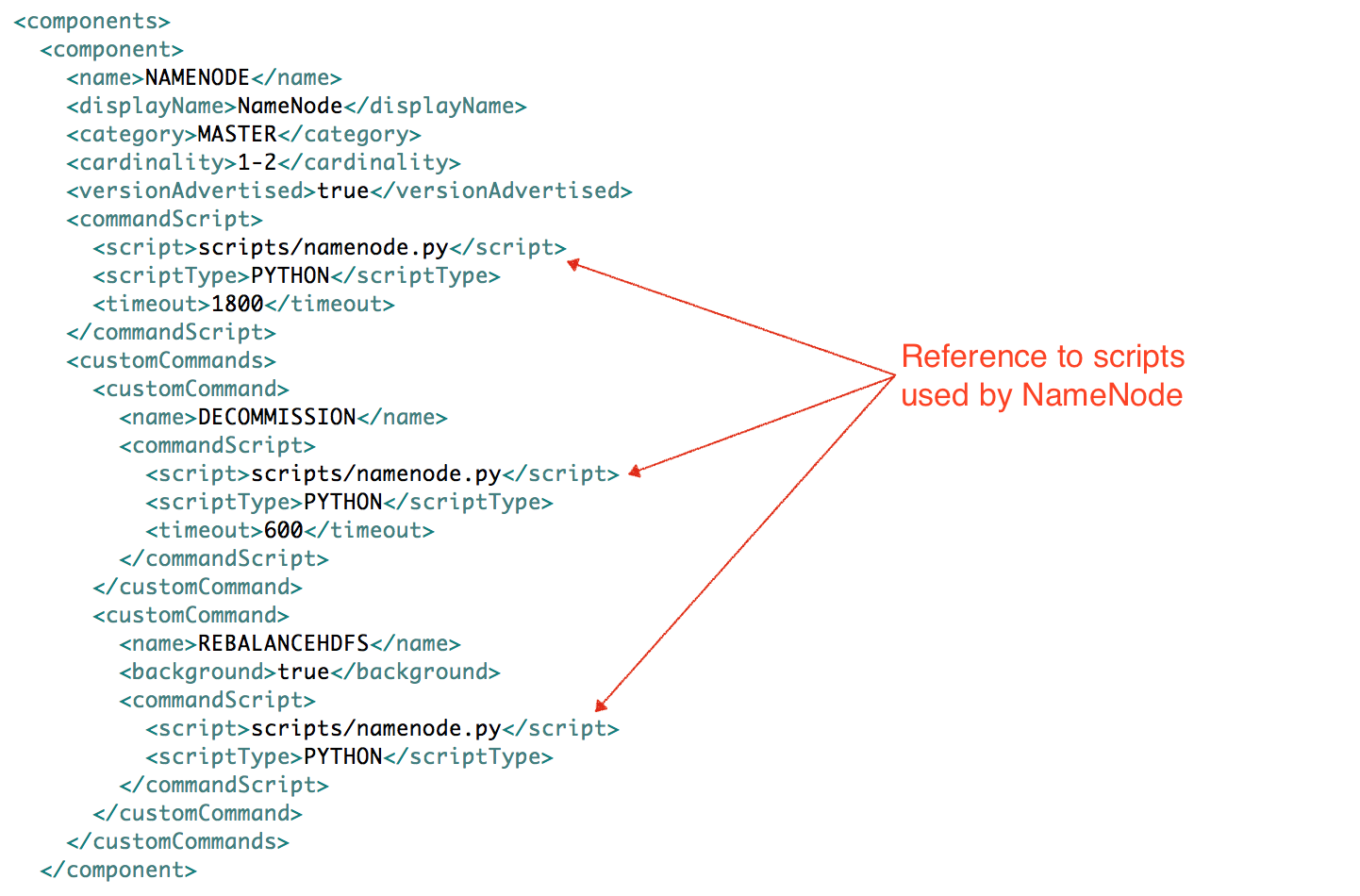
这些脚本应放在 __ 文件夹中。
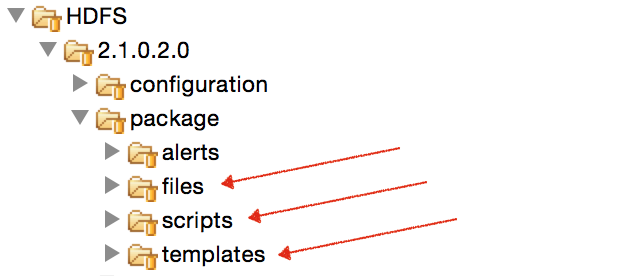
package/scripts
| 文件夹 | 用途 |
|---|---|
| package/scripts | 包含 Ambari 调用的脚本。这些脚本会以正确的环境加载到执行路径中。 示例:HDFS |
| package/files | 包含上述脚本使用的文件。通常是作为独立进程调用的其他脚本(bash、python 等)。 示例:checkWebUI.py 在 HDFS service-check 中运行,用于确定 Journal Nodes 是否可用 |
| package/templates | 上述脚本用于在受管主机上生成文件的模板文件。通常是服务运行所需的配置文件。 示例:exclude_hosts_list.j2,脚本使用它生成 /etc/hadoop/conf/dfs.exclude |
Python
Ambari 默认支持使用 Python 脚本管理服务和组件。
组件脚本应扩展 resource_management.Script 类,并提供该组件生命周期所需的方法。
根据如何创建自定义堆栈页面,MASTER、SLAVE 和 CLIENT 组件需要以下方法来完成其生命周期。
import sys
from resource_management import Script
class Master(Script):
  def install(self, env):
    print 'Install the Sample Srv Master';
  def stop(self, env):
    print 'Stop the Sample Srv Master';
  def start(self, env):
    print 'Start the Sample Srv Master';
  def status(self, env):
    print 'Status of the Sample Srv Master';
  def configure(self, env):
    print 'Configure the Sample Srv Master';
if __name__ == "__main__":
  Master().execute()
import sys
from resource_management import Script
class Slave(Script):
  def install(self, env):
    print 'Install the Sample Srv Slave';
  def stop(self, env):
    print 'Stop the Sample Srv Slave';
  def start(self, env):
    print 'Start the Sample Srv Slave';
  def status(self, env):
    print 'Status of the Sample Srv Slave';
  def configure(self, env):
    print 'Configure the Sample Srv Slave';
if __name__ == "__main__":
  Slave().execute()
import sys
from resource_management import Script
class SampleClient(Script):
  def install(self, env):
    print 'Install the Sample Srv Client';
  def configure(self, env):
    print 'Configure the Sample Srv Client';
if __name__ == "__main__":
  SampleClient().execute()
Ambari 提供以下有助于编写服务脚本的 Python 库。有关这些库的完整参考,请访问 Ambari Python Libraries 页面。
- resource_management
- ambari_commons
- ambari_simplejson
OS Variant Scripts
如果服务支持多个操作系统且需要单独的脚本,可以使用不同的 @OsFamilyImpl() 注解扩展基础 resource_management.Script 类。
这样可以仅分离组件中与操作系统相关的方法。
示例:NameNode 默认脚本、NameNode Windows 脚本。
DataNode 启动和停止。
HDFS 配置持久化
Custom Actions
有时服务需要执行该服务特有的操作,这些操作超出了 Ambari 提供的默认操作(如 install、_start、stop、configure 等)。
服务可以定义此类操作并在 UI 中向用户公开,以便轻松调用。
下面以 HDFS 实现的 Rebalance HDFS 自定义操作为例。
Stack Changes
-
Define custom command inside the customCommands section of the component in metainfo.xml.
-
Implement method with same name as custom command in script referenced from metainfo.xml.
-
如果自定义命令没有操作系统变体,可以在扩展 resource_management.Script 的同一个类中实现。
-
如果存在操作系统变体,可以在使用 @OsFamilyImpl(os_family=...) 注解的各个类中实现不同方法。默认 rebalancehdfs、Windows rebalancehdfs。
这样后端就可以在安装了该服务的所有受管主机上运行脚本。
UI Changes
无需修改 UI 即可在主机页面看到自定义操作。
该操作应显示在主机组件的操作列表中。任何主组件操作都会自动显示在服务操作菜单中。
在 UI 中单击该操作时,会自动发起 POST 调用以触发上述脚本。
问题:如何为 UI 中的自定义操作提供自己的标签和图标? 在 Ambari UI 中,将组件操作及自定义图标和名称添加到 App.HostComponentActionMap 对象中。例如:REBALANCEHDFS。
配置
服务的配置文件默认应放置在 _ configuration_ 文件夹中。
如果必须使用其他名称的文件夹,可以在 metainfo.xml 中使用 < configuration-dir> 元素指向该文件夹。
metainfo.xml 中与配置相关的重要部分如下:
<?xml version="1.0"?>
<metainfo>
  <schemaVersion>2.0</schemaVersion>
  <services>
    <service>
      <name>HDFS</name>
      <displayName>HDFS</displayName>
      <comment>Apache Hadoop Distributed File System</comment>
      <version>2.1.0.2.0</version>
      <components>
        ...
        <component>
          <name>HDFS_CLIENT</name>
          ...
          <configFiles>
            <configFile>
              <type>xml</type>
              <fileName>hdfs-site.xml</fileName>
              <dictionaryName>hdfs-site</dictionaryName>
            </configFile>
            <configFile>
              <type>xml</type>
              <fileName>core-site.xml</fileName>
              <dictionaryName>core-site</dictionaryName>
            </configFile>
            <configFile>
              <type>env</type>
              <fileName>log4j.properties</fileName>
              <dictionaryName>hdfs-log4j,yarn-log4j</dictionaryName>
            </configFile>
            <configFile>
              <type>env</type>
              <fileName>hadoop-env.sh</fileName>
              <dictionaryName>hadoop-env</dictionaryName>
            </configFile>
          </configFiles>
          ...
          <configuration-dependencies>
             <config-type>core-site</config-type>
             <config-type>hdfs-site</config-type>
          </configuration-dependencies>
        </component>
          ...
      </components>

      <configuration-dir>configuration</configuration-dir>
      <configuration-dependencies>
        <config-type>core-site</config-type>
        <config-type>hdfs-site</config-type>
        <config-type>hadoop-env</config-type>
        <config-type>hadoop-policy</config-type>
        <config-type>hdfs-log4j</config-type>
        <config-type>ranger-hdfs-plugin-properties</config-type>
        <config-type>ssl-client</config-type>
        <config-type>ssl-server</config-type>
        <config-type>ranger-hdfs-audit</config-type>
        <config-type>ranger-hdfs-policymgr-ssl</config-type>
        <config-type>ranger-hdfs-security</config-type>
        <config-type>ams-ssl-client</config-type>
      </configuration-dependencies>
    </service>
  </services>
</metainfo>
-
config-type - 表示一组配置的字符串。例如:core-site、hdfs-site、yarn-site 等。在 Ambari 中保存配置时,配置会持久化在不可变的 config-type 版本中。如果修改并保存 HDFS core-site 配置 4 次,就会有 4 个 core-site config-type 版本。此外,保存服务配置时,只会更新发生变化的 config-type。
-
configFiles - 列出封装组件处理的配置文件
-
configFile - 表示某一类型的一个配置文件
-
type - 文件类型,不同类型会以不同方式生成内容
- xml - 以 Hadoop 友好格式生成的 XML 文件。示例:hdfs-site.xml
- env - 通常用于脚本,内容值作为模板使用。模板包含 config-tags,其值在生成文件时于运行时填充。示例:hadoop-env.sh
- properties - 生成条目为 key=value 格式的属性文件。示例:falcon-runtime.properties
-
dictionaryName - 用于存储此配置文件键值的 config-type 名称
-
-
configuration-dependencies - 列出此组件或服务所依赖的 config-type。此依赖的影响之一是:每当 config-type 更新时,Ambari 会自动将组件或服务标记为需要重启。根据上面的代码,每当 core-site 更新时,HDFS 服务和 HDFS_CLIENT 组件都会被标记为需要重启。
-
configuration-dir - 放置 configFiles 中所列文件的目录。可选,默认值为 configuration。
在 config-type 中添加新配置
向 config-type 添加配置项时可以指定许多不同参数,详见此处。
UI - Categories
上面定义的配置会显示在服务的 Configs 页面中。
要在 UI 中自定义配置类别和顺序,必须更新以下文件。
创建类别 - 更新 _ ambari-web/app/models/stack_service.js_ 文件,添加自己的服务及新类别。
使用类别 - 要将配置放入指定类别并指定配置顺序,请将配置添加到 ambari-web/app/data/HDP2/site_properties.js 文件。在此文件中可以指定要使用的类别以及配置应放置的索引。ambari-web/app/data 中的堆栈文件夹具有层级结构,并继承先前版本。此处定义配置到各部分的映射。示例:Hive 类别、Tez 类别。
UI - 增强配置
Enhanced Configs 功能使服务提供商无需修改任何 UI 代码即可大幅自定义服务配置,并决定向用户突出显示哪些配置。自定义内容包括提供易用的服务布局、更好的控件(滑块、组合框、列表、切换开关、微调器等)、更好的验证(最小值、最大值、枚举)、自动单位转换(MB、GB、秒、毫秒等)、配置依赖以及改进的默认值动态推荐。
服务提供商只需更改 stacks/ 文件夹中的服务定义,即可完成上述所有操作。
更多信息请参阅 _ Enhanced Configs_ 页面。
告警
每个服务都可以通过提供 alerts.json 文件定义 Ambari 应跟踪的警报。
有关 Ambari Alerts 框架的更多信息,请参阅 Alerts wiki 页面,有关 alerts.json 格式的信息请参阅 Alerts 定义文档。
Kerberos
Ambari 能够为集群启用和禁用 Kerberos。为告知 Ambari 服务及其组件要使用的身份和配置,每个服务都可以提供 kerberos.json 文件。
有关 Kerberos 支持的更多信息,请参阅 _ Automated Kerberization_ wiki 页面,有关 Kerberos 描述符的信息请参阅 Kerberos Descriptor 文档。
Metrics
Ambari 提供 Ambari Metrics System(“AMS”) 服务,用于在 Ambari 管理的集群中收集、聚合和提供 Hadoop 及系统指标。
每个服务都可以通过定义 metrics.json 文件指定 AMS 应收集和提供的指标。
有关 metrics.json 文件格式的信息,请参阅 Stack Defined Metrics 页面。
Quick Links
服务可以按照预定义的 JSON 格式向文本文件添加元信息,从而将快速链接列表添加到 Ambari Web UI。Ambari Server 会解析快速链接 JSON 文件并将其内容提供给 UI,使 Ambari Web UI 可以根据这些信息计算快速链接 URL,并相应填充快速链接下拉列表。
有关快速链接 JSON 文件设计的更多信息,请参阅 Quick Links 页面。
Widgets
每个服务都可以通过定义 widgets.json 文件,指定服务摘要页面默认显示的部件和热力图。
有关部件描述符的更多信息,请参阅 Enhanced Service Dashboard 页面。
Role Command Order
从 Ambari 2.2 开始,每个服务都可以通过在服务文件夹中包含 role_command_order.json 文件来定义自己的角色命令顺序。服务只应指定其组件与其他组件之间的关系。换言之,如果服务只包含 COMP_X,则只应列出与 COMP_X 相关的依赖关系。如果 COMP_X 启动时依赖 NameNode 启动,并且 NameNode 停止时应等待 COMP_X 停止,则角色命令顺序应包含以下内容:
Example service role_command_order.json
"COMP_X-START": ["NAMENODE-START"],
    "NAMENODE-STOP": ["COMP_X-STOP"]
服务角色命令顺序中的条目会与堆栈中定义的角色命令顺序合并。例如,由于堆栈已经具有 NAMENODE-STOP 依赖关系,上例中的 COMP_X-STOP 会添加到其余 NAMENODE-STOP 依赖关系中,而 COMP_X-START 对 NAMENODE-START 的依赖则会作为新依赖添加。
有关角色命令顺序的更多详情,请参阅下面的 Role Command Order 部分。
服务 Advisor
从 Ambari 2.4 开始,每个服务都可以选择定义自己的服务顾问,而不是在堆栈顾问中定义配置和布局详情。这对未在堆栈中定义的自定义服务尤其有用。Ambari 提供 Service Advisor 功能,服务可以在其服务文件夹中编写名为 service-advisor.py 的 Python 脚本。该文件夹可以位于定义服务的堆栈 services 目录中,也可以从 common-services 或其他位置的服务定义继承。示例:common-services/HAWQ/2.0.0。
与 Stack-advisor 脚本不同,service-advisor 脚本不会自动扩展父服务的 service-advisor 脚本。service-advisor 脚本需要显式扩展父服务的 service-advisor 脚本。以下代码示例展示如何引用父级的 service_advisor.py;此处扩展的是 resources/stacks 目录中的根 service-advisor.py 文件。
Sample service-advisor.py file inheritance
SCRIPT_DIR = os.path.dirname(os.path.abspath(__file__))
STACKS_DIR = os.path.join(SCRIPT_DIR, '../../../stacks/')
PARENT_FILE = os.path.join(STACKS_DIR, 'service_advisor.py')

try:
  with open(PARENT_FILE, 'rb') as fp:
    service_advisor = imp.load_module('service_advisor', fp, PARENT_FILE, ('.py', 'rb', imp.PY_SOURCE))
except Exception as e:
  traceback.print_exc()
  print "Failed to load parent"

class HAWQ200ServiceAdvisor(service_advisor.ServiceAdvisor):
与堆栈顾问类似,服务顾问会提供以下 4 个重要方面的信息:
- Recommend layout of the service on cluster
- Recommend service configurations
- Validate layout of the service on cluster
- Validate service configurations
通过提供 service-advisor.py 文件,可以动态控制服务的上述各个方面。
service-advisor 脚本的主接口包含上述各项的调用方式及所提供数据的文档。
class ServiceAdvisor(DefaultStackAdvisor):
"""
  Abstract class implemented by all service advisors.

"""

"""
  If any components of the service should be colocated with other services,
  this is where you should set up that layout.  Example:

    # colocate HAWQSEGMENT with DATANODE, if no hosts have been allocated for HAWQSEGMENT
    hawqSegment = [component for component in serviceComponents if component["StackServiceComponents"]["component_name"] == "HAWQSEGMENT"][0]
    if not self.isComponentHostsPopulated(hawqSegment):
      for hostName in hostsComponentsMap.keys():
        hostComponents = hostsComponentsMap[hostName]
        if {"name": "DATANODE"} in hostComponents and {"name": "HAWQSEGMENT"} not in hostComponents:
          hostsComponentsMap[hostName].append( { "name": "HAWQSEGMENT" } )
        if {"name": "DATANODE"} not in hostComponents and {"name": "HAWQSEGMENT"} in hostComponents:
          hostComponents.remove({"name": "HAWQSEGMENT"})
"""
  def colocateService(self, hostsComponentsMap, serviceComponents):
    pass

"""
  Any configuration recommendations for the service should be defined in this function.

  This should be similar to any of the recommendXXXXConfigurations functions in the stack_advisor.py
  such as recommendYARNConfigurations().

"""
  def getServiceConfigurationRecommendations(self, configurations, clusterSummary, services, hosts):
    pass

"""
  Returns an array of Validation objects about issues with the hostnames to which components are assigned.

  This should detect validation issues which are different than those the stack_advisor.py detects.

  The default validations are in stack_advisor.py getComponentLayoutValidations function.

"""
  def getServiceComponentLayoutValidations(self, services, hosts):
    return []

"""
  Any configuration validations for the service should be defined in this function.

  This should be similar to any of the validateXXXXConfigurations functions in the stack_advisor.py
  such as validateHDFSConfigurations.

"""
  def getServiceConfigurationsValidationItems(self, configurations, recommendedDefaults, services, hosts):
    return []
示例
- Service Advisor interface
- HAWQ 2.0.0 Service Advisor implementation
- PXF 3.0.0 Service Advisor implementation
服务 Upgrade
从 Ambari 2.4 开始,每个服务都可以在其服务定义中定义升级流程。这对自定义服务尤其有用,因为它们不再需要修改堆栈的 upgrade-pack 即可集成到集群升级中。
每个服务都可以定义 upgrade-packs,这些 XML 文件描述该服务的升级流程,以及升级包与整个堆栈 upgrade-pack 的关系。这些 upgrade-pack XML 文件放置在服务的 upgrades/ 文件夹中,并按其要扩展的堆栈版本放入不同子文件夹。测试代码中提供了一些示例。
示例
服务定义的每个 upgrade-pack 都应与特定堆栈版本定义的服务文件名匹配。例如在测试代码中,HDP 2.2.0 包含 upgrade_test_15388.xml upgrade-pack。HDFS 服务在 HDP/2.0.5/services/HDFS/upgrades/HDP/2.2.0/upgrade_test_15388.xml 中定义了该升级包的扩展。此例中 upgrade-pack 定义在 HDP/2.0.5 堆栈中。由于它定义在 upgrade/HDP/2.2.0 目录中,因此是 HDP/2.2.0 的扩展。最后,服务对 upgrade-pack 的扩展文件 upgrade_test_15388.xml 的名称与 HDP/2.2.0/upgrades 中 upgrade-pack 的名称匹配。
服务文件格式与堆栈的格式基本相同。target、target-stack 和 type 属性应与堆栈 upgrade-pack 中的值相同。服务可以添加自己的前置条件检查。
General Attributes and Prerequisite Checks
<upgrade xmlns:xsi="http://www.w3.org/2001/XMLSchema-instance">
  <target>2.4.*</target>
  <target-stack>HDP-2.4.0</target-stack>
  <type>ROLLING</type>
  <prerequisite-checks>
    <check>org.apache.ambari.server.checks.FooCheck</check>
  </prerequisite-checks>
upgrade-pack 的 order 部分由 group 元素组成,与堆栈 upgrade-pack 类似。主要区别在于需要定义这些组与堆栈升级包或其他服务 upgrade-pack 中组的关系。第一个示例引用 PRE_CLUSTER 组,并为服务 FOO 添加新的 execute-stage。根据 <add-after-group-entry> 标签,该条目应添加到 HDFS 的 execute-stage 之后。
<order>
  <group xsi:type="cluster" name="PRE_CLUSTER" title="Pre {{direction.text.proper}}">
    <add-after-group-entry>HDFS</add-after-group-entry>
    <execute-stage service="FOO" component="BAR" title="Backup FOO">
      <task xsi:type="manual">
        <message>Back FOO up.</message>
      </task>
    </execute-stage>
  </group>
同样的语法也可用于排列其他部分,例如服务检查优先级和服务组。
<group name="SERVICE_CHECK1" title="All Service Checks" xsi:type="service-check">
  <add-after-group-entry>ZOOKEEPER</add-after-group-entry>
  <priority>
    <service>HBASE</service>
  </priority>
</group>

<group name="CORE_MASTER" title="Core Masters">
  <add-after-group-entry>YARN</add-after-group-entry>
  <service name="HBASE">
    <component>HBASE_MASTER</component>
  </service>
</group>
也可以添加新组,并将其排列在堆栈 upgrade-pack 中其他组之后。以下示例使用 add-after-group 标签将 FOO 组添加到 HIVE 组之后。
<group name="FOO" title="Foo">
  <add-after-group>HIVE</add-after-group>
  <skippable>true</skippable>
  <allow-retry>false</allow-retry>
  <service name="FOO">
    <component>BAR</component>
  </service>
</group>
还可以在同一组中同时包含 add-after-group 和 add-after-group-entry 标签。如果组尚不存在,这会创建新组,并将其排列在 add-after-group 指定的组名之后。add-after-group-entry 将决定该组内服务、优先级或 execute-stage 的顺序。
<group name="FOO" title="Foo">
  <add-after-group>HIVE</add-after-group>
  <add-after-group-entry>FOO</add-after-group-entry>
  <skippable>true</skippable>
  <allow-retry>false</allow-retry>
  <service name="FOO2">
    <component>BAR2</component>
  </service>
</group>
upgrade-pack 的 processing 部分与堆栈 upgrade-pack 中的内容保持一致。
   <processing>
    <service name="FOO">
      <component name="BAR">
        <upgrade>
          <task xsi:type="restart-task" />
        </upgrade>
      </component>
      <component name="BAR2">
        <upgrade>
          <task xsi:type="restart-task" />
        </upgrade>
      </component>
    </service>
  </processing>
定义 Stack
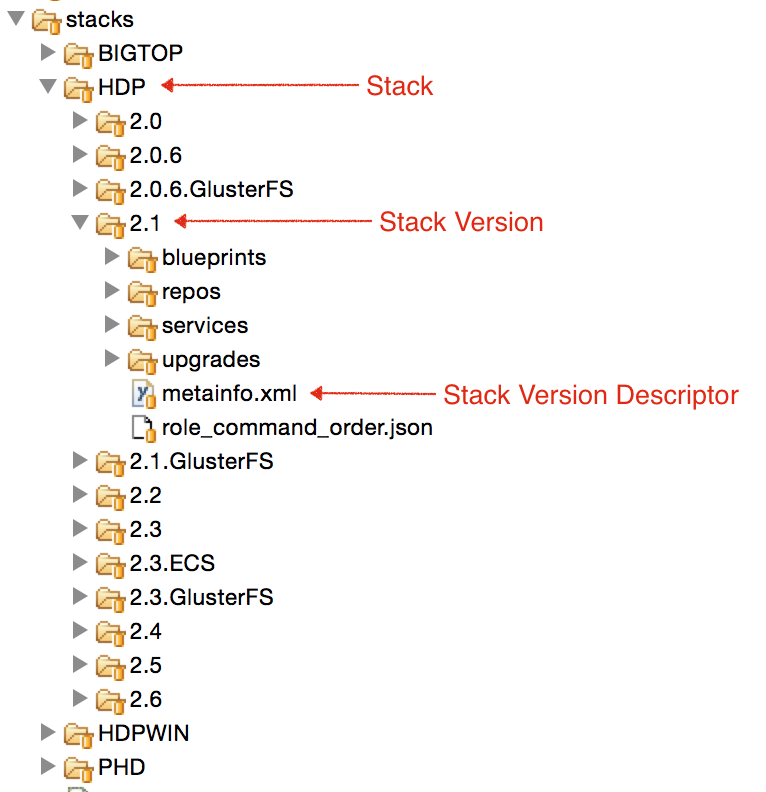
Stack 是按版本管理的服务集合。每个 Stack 都是在源代码 ambari-server/src/main/resources/stacks 中定义的目录。安装后,这些 Stack 定义可在 ambari-server 计算机的 /var/lib/ambari-server/resources/stacks 中使用。
每个 Stack 目录针对每个 Stack 版本包含一个子目录。其中一些 Stack 版本处于活动状态,另一些则不是。每个 Stack 版本都包含服务,这些服务要么引用自 common-services,要么定义在该 Stack 版本的 services 目录中。
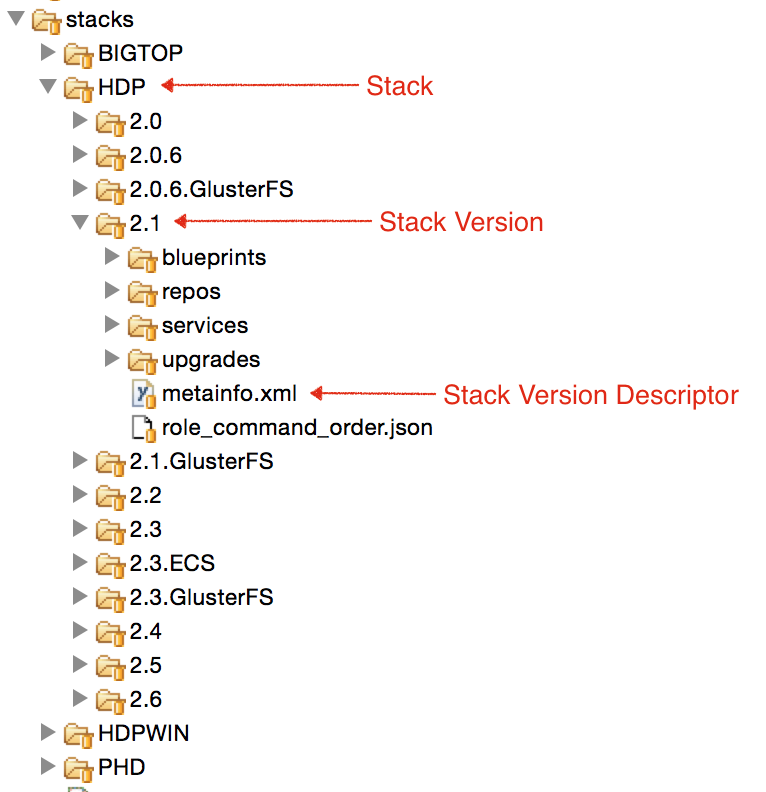
示例:HDP Stack。HDP-2.4 Stack 版本。
Stack 版本描述符
每个 Stack 版本都应提供一个 metainfo.xml 描述符文件(示例:HDP-2.3、HDP-2.4),用于描述该 Stack 版本的以下信息:
<metainfo>
    <versions>
      <active>true</active>
    </versions>
    <extends>2.3</extends>
    <minJdk>1.7</minJdk>
    <maxJdk>1.8</maxJdk>
</metainfo>
-
versions/active - 此 Stack 版本是否仍可安装。如果不可用,安装期间此版本不会显示在 UI 中。
-
extends - 此 Stack 中正在扩展的 Stack 版本。扩展的 Stack 版本会继承服务以及父 Stack 版本的几乎所有方面。
-
minJdk - 此 Stack 版本支持的最低 JDK。如果 Ambari 使用的 JDK 低于此版本,安装向导会向用户发出警告。
-
maxJdk - 此 Stack 版本支持的最高 JDK。如果 Ambari 使用的 JDK 高于此版本,安装向导会向用户发出警告。
Stack 属性
堆栈必须包含或继承 properties 目录,其中包含两个文件:stack_features.json 和 stack_tools.json。此目录是在 Ambari 2.4 中新增的。
stack_features.json 包含 Ambari 中提供的功能列表,并允许堆栈指定哪些堆栈版本包含这些功能。功能列表由特定 Ambari 发布版本决定。特定 Ambari 版本的参考列表应在该版本分支的 HDP/2.0.6/properties/stack_features.json 中找到。每个功能都有名称和描述,堆栈可以提供该功能受支持的最低和最高版本。
{

"stack_features": [

{

"name": "snappy",

"description": "Snappy compressor/decompressor support",

"min_version": "2.0.0.0",

"max_version": "2.2.0.0"

},

...

}
stack_tools.json 包含 stack_selector 和 conf_selector 工具的名称及安装位置。
{

"stack_selector": ["hdp-select", "/usr/bin/hdp-select", "hdp-select"],

"conf_selector": ["conf-select", "/usr/bin/conf-select", "conf-select"]

}
任何自定义堆栈都必须包含这两个 JSON 文件。更多信息请参阅 Stack Properties wiki 页面。
服务
每个堆栈版本都包含服务,这些服务要么从 common-services 引用,要么定义在堆栈版本的 services 文件夹中。
如果服务会在多个堆栈之间共享,则定义在 common-services 中;如果不会共享,则可以定义在堆栈版本内部。
参考 common-services
要引用 common-services 中的服务,服务描述符文件应使用 < extends> 元素。(示例:HDP-2.0.6 中的 HDFS)
<metainfo>
  <schemaVersion>2.0</schemaVersion>
  <services>
    <service>
      <name>HDFS</name>
      <extends>common-services/HDFS/2.1.0.2.0</extends>
    </service>
  </services>
</metainfo>
Define 服务
可以完全按照 common-services 中服务的格式,在 services 文件夹中定义新服务。
Examples:
Extend 服务
当一个堆栈版本扩展另一个堆栈版本时,会继承父服务的所有详细信息,也可以覆盖和删除继承服务定义的任意部分。
Examples:
- HDP-2.3 / HDFS -添加 NFS_GATEWAY 组件、更新服务版本和操作系统专用软件包
- HDP-2.2 / Storm -删除 STORM_REST_API 组件、更新服务版本和操作系统专用软件包
- HDP-2.3 / YARN -从 capacity-scheduler.xml 删除 YARN 节点标签配置
- HDP-2.3 / Kafka -添加 Kafka Broker Process 警报
Role Command Order
Role is another name for Component (Ex: NAMENODE, DATANODE, RESOURCEMANAGER, HBASE_MASTER, etc.)
顾名思义,可以告知 Ambari 堆栈中定义的组件应按何种顺序运行命令。
例如:“应在启动 NameNode 之前启动 ZooKeeper Server”,或“只有在 NameNode 和 DataNodes 启动后才能启动 HBase Master”。
可以通过在堆栈版本文件夹中包含 role_command_order.json 文件来指定。
Format
该文件采用 JSON 格式,包含一个 JSON 对象,顶级键可以是部分名称或注释。例如:HDP-2.0.6。
在每个部分对象中,键描述依赖的组件操作,值列出应在该操作之前执行的组件操作。
{
  "_comment": "Section 1 comment",
  "section_name_1": {
    "_comment": "Section containing role command orders",
    "-": ["-", "-"],
    "-": ["-"],
    ...

  },
  "_comment": "Next section comment",
  ...

}
Sections
Ambari 仅使用以下部分:
| Section Name | When Used |
|---|---|
| general_deps | 命令顺序适用于所有情况 |
| optional_glusterfs | 集群存在 GLUSTERFS 服务实例时应用命令顺序 |
| optional_no_glusterfs | 集群不存在 GLUSTERFS 服务实例时应用命令顺序 |
| namenode_optional_ha | 安装 HDFS 服务且存在 JOURNALNODE 组件时应用命令顺序(启用 HDFS HA) |
| resourcemanager_optional_ha | 安装 YARN 服务且存在多个 RESOURCEMANAGER 主机组件时应用命令顺序(启用 YARN HA) |
Commands
Ambari 当前支持的命令包括:
- INSTALL
- UNINSTALL
- START
- RESTART
- STOP
- EXECUTE
- ABORT
- UPGRADE
- SERVICE_CHECK
- CUSTOM_COMMAND
- ACTIONEXECUTE
示例
| 角色命令顺序 | 说明 |
|---|---|
| "HIVE_METASTORE-START": ["MYSQL_SERVER-START", "NAMENODE-START"] | 启动 Hive Metastore 前先启动 MySQL 和 NameNode 组件 |
| "MAPREDUCE_SERVICE_CHECK-SERVICE_CHECK": ["NODEMANAGER-START", "RESOURCEMANAGER-START"], | MapReduce 服务检查需要先启动 ResourceManager 和 NodeManager |
| "ZOOKEEPER_SERVER-STOP" : ["HBASE_MASTER-STOP", "HBASE_REGIONSERVER-STOP", "METRICS_COLLECTOR-STOP"], | 停止 ZooKeeper 服务器前,确保 HBase Master、HBase RegionServer 和 AMS Metrics Collector 已停止。 |
Repositories
每个堆栈版本都可以通过提供 repos/repoinfo.xml 指定要使用的软件包仓库位置(示例:HDP-2.0.6)。 repoinfo.xml 文件包含按操作系统分组的仓库。每个操作系统指定一个仓库列表,选择堆栈版本进行安装时会向用户显示该列表。
这些仓库与服务 metainfo.xml 中定义的 packages 配合使用,以在系统上安装适当的软件。
<reposinfo>
  <os family="redhat6">
    <repo>
      <baseurl>http://public-repo-1.hortonworks.com/HDP/centos6/2.x/updates/2.0.6.1</baseurl>
      <repoid>HDP-2.0.6</repoid>
      <reponame>HDP</reponame>
    </repo>
    <repo>
      <baseurl>http://public-repo-1.hortonworks.com/HDP-UTILS-1.1.0.17/repos/centos6</baseurl>
      <repoid>HDP-UTILS-1.1.0.17</repoid>
      <reponame>HDP-UTILS</reponame>
    </repo>
  </os>
<reposinfo>
baseurl- URL of the RPM repository where provided repoid can be found repoid - Repo ID to use that are hosted at _baseurl reponame - Display name for the repo being used.
Latest Builds
虽然仓库基础 URL 可以为特定仓库提供更新,但必须在构建时定义。当仓库更改位置或更新构建托管在其他站点时,之后可能会产生问题。
对于这类场景,堆栈版本可以提供 JSON 文件的位置,该文件可提供其他要使用的仓库 URL 详情。
例如:HDP-2.3 repoinfo.xml 会指向可找到最新构建的备用仓库 URL:
{
    ...

    "HDP-2.3":{
        "latest":{
            "centos6":"http://s3.amazonaws.com/dev.hortonworks.com/HDP/centos6/2.x/BUILDS/2.3.6.0-3586/",
            "centos7":"http://s3.amazonaws.com/dev.hortonworks.com/HDP/centos7/2.x/BUILDS/2.3.6.0-3586/",
            "debian6":"http://s3.amazonaws.com/dev.hortonworks.com/HDP/debian6/2.x/BUILDS/2.3.6.0-3586/",
            "debian7":"http://s3.amazonaws.com/dev.hortonworks.com/HDP/debian7/2.x/BUILDS/2.3.6.0-3586/",
            "suse11":"http://s3.amazonaws.com/dev.hortonworks.com/HDP/suse11sp3/2.x/BUILDS/2.3.6.0-3586/",
            "ubuntu12":"http://s3.amazonaws.com/dev.hortonworks.com/HDP/ubuntu12/2.x/BUILDS/2.3.6.0-3586/",
            "ubuntu14":"http://s3.amazonaws.com/dev.hortonworks.com/HDP/ubuntu14/2.x/BUILDS/2.3.6.0-3586/"
        }
    },
    ...

}
钩子
堆栈版本可以包含适用于所有服务的基本通用指令,这些指令需要在某些 Ambari 命令之前或之后运行。
Ambari 提供 Hooks 功能,将通用的前置和后置代码集中到 hooks 文件夹中,避免在所有服务脚本中重复代码并让用户操心。(示例:HDP-2.0.6)
Command Sub-Folders
钩子子文件夹的一般命名模式为 "<before|after>-<ANY|<CommandName>>"。
这意味着子文件夹下的 scripts/hook.py 文件会在命令之前或之后运行。
Examples:
| 子文件夹 | 用途 | 示例 |
|---|---|---|
| before-START | 在堆栈版本任意组件运行 START 命令前调用钩子脚本。 | HDP-2.0.6 设置 Hadoop 日志和 pid 目录 创建 Java Home 符号链接 创建 /etc/hadoop/conf/topology_script.py 等。 |
| before-INSTALL | 安装堆栈版本任意组件前调用钩子脚本 | HDP-2.0.6 在 /etc/yum.repos.d 中创建仓库文件 安装 curl、unzip 等基本软件包。 |
根据 Ambari 当前支持的命令,可以按需创建以下子文件夹:
| Prefix | - | Command |
|---|---|---|
| before | - | INSTALL UNINSTALL START RESTART STOP |
| after | - | EXECUTE ABORT UPGRADE SERVICE_CHECK <custom_command>-用户指定的自定义命令,例如 HDFS 指定的 DECOMMISSION 或 REBALANCEHDFS 命令 |
scripts/hook.py 脚本应导入 resource_management.libraries.script.hook 模块并扩展 Hook 类。
from resource_management.libraries.script.hook import Hook

class CustomHook(Hook):
  def hook(self, env):
    # Do custom work

if __name__ == "__main__":
  CustomHook().execute()
配置s
虽然大多数配置在服务级别设置,但也可以存在适用于所有服务、用于表示使用此堆栈安装的集群状态的配置。
例如,“是否启用安全?”、“由哪个用户运行冒烟测试?” 等。
这类配置可以在堆栈的 configuration 文件夹中定义,访问方式与服务级配置相同。
Stack Advisor
由于每个堆栈包含多个复杂服务,因此需要动态确定服务在集群中的布局以及某些配置的值。
Ambari 提供 Stack Advisor 功能,堆栈可以在 services/ 文件夹中编写名为 stack-advisor.py 的 Python 脚本。示例:HDP-2.0.6。
Stack-advisor 脚本会自动扩展父堆栈版本的 stack-advisor 脚本。这使较新的堆栈版本可以更改行为,而不影响早期行为。
Stack advisor 提供以下 4 个重要方面的信息:
- 推荐服务在集群中的布局
- 推荐服务配置
- 验证服务在集群中的布局
- 验证服务配置
通过提供 stack-advisor.py 文件,可以动态控制上述各个方面。
stack-advisor 脚本的主接口包含上述各项的调用方式及所提供数据的文档。
class StackAdvisor(object):
"""
  Abstract class implemented by all stack advisors. Stack advisors advise on stack specific questions.

  Currently stack advisors provide following abilities:
  - Recommend where services should be installed in cluster
  - Recommend configurations based on host hardware
  - Validate user selection of where services are installed on cluster
  - Validate user configuration values

  Each of the above methods is passed in parameters about services and hosts involved as described below.

    @type services: dictionary
    @param services: Dictionary containing all information about services selected by the user.

      Example: {
      "services": [
        {
          "StackServices": {
            "service_name" : "HDFS",
            "service_version" : "2.6.0.2.2",
          },
          "components" : [
            {
              "StackServiceComponents" : {
                "cardinality" : "1+",
                "component_category" : "SLAVE",
                "component_name" : "DATANODE",
                "display_name" : "DataNode",
                "service_name" : "HDFS",
                "hostnames" : []
              },
              "dependencies" : []
            }, {
              "StackServiceComponents" : {
                "cardinality" : "1-2",
                "component_category" : "MASTER",
                "component_name" : "NAMENODE",
                "display_name" : "NameNode",
                "service_name" : "HDFS",
                "hostnames" : []
              },
              "dependencies" : []
            },
            ...

          ]
        },
        ...

      ]
    }
  @type hosts: dictionary
  @param hosts: Dictionary containing all information about hosts in this cluster
    Example: {
      "items": [
        {
          Hosts: {
            "host_name": "c6401.ambari.apache.org",
            "public_host_name" : "c6401.ambari.apache.org",
            "ip": "192.168.1.101",
            "cpu_count" : 1,
            "disk_info" : [
              {
              "available" : "4564632",
              "used" : "5230344",
              "percent" : "54%",
              "size" : "10319160",
              "type" : "ext4",
              "mountpoint" : "/"
              },
              {
              "available" : "1832436",
              "used" : "0",
              "percent" : "0%",
              "size" : "1832436",
              "type" : "tmpfs",
              "mountpoint" : "/dev/shm"
              }
            ],
            "host_state" : "HEALTHY",
            "os_arch" : "x86_64",
            "os_type" : "centos6",
            "total_mem" : 3664872
          }
        },
        ...

      ]
    }

    Each of the methods can either return recommendations or validations.

    Recommendations are made in a Ambari Blueprints friendly format.

    Validations are an array of validation objects.

"""

  def recommendComponentLayout(self, services, hosts):
"""
    Returns recommendation of which hosts various service components should be installed on.

    This function takes as input all details about services being installed, and hosts
    they are being installed into, to generate hostname assignments to various components
    of each service.

    @type services: dictionary
    @param services: Dictionary containing all information about services selected by the user.

    @type hosts: dictionary
    @param hosts: Dictionary containing all information about hosts in this cluster
    @rtype: dictionary
    @return: Layout recommendation of service components on cluster hosts in Ambari Blueprints friendly format.

        Example: {
          "resources" : [
            {
              "hosts" : [
                "c6402.ambari.apache.org",
                "c6401.ambari.apache.org"
              ],
              "services" : [
                "HDFS"
              ],
              "recommendations" : {
                "blueprint" : {
                  "host_groups" : [
                    {
                      "name" : "host-group-2",
                      "components" : [
                        { "name" : "JOURNALNODE" },
                        { "name" : "ZKFC" },
                        { "name" : "DATANODE" },
                        { "name" : "SECONDARY_NAMENODE" }
                      ]
                    },
                    {
                      "name" : "host-group-1",
                      "components" :
                        { "name" : "HDFS_CLIENT" },
                        { "name" : "NAMENODE" },
                        { "name" : "JOURNALNODE" },
                        { "name" : "ZKFC" },
                        { "name" : "DATANODE" }
                      ]
                    }
                  ]
                },
                "blueprint_cluster_binding" : {
                  "host_groups" : [
                    {
                      "name" : "host-group-1",
                      "hosts" : [ { "fqdn" : "c6401.ambari.apache.org" } ]
                    },
                    {
                      "name" : "host-group-2",
                      "hosts" : [ { "fqdn" : "c6402.ambari.apache.org" } ]
                    }
                  ]
                }
              }
            }
          ]
        }
"""
    pass

  def validateComponentLayout(self, services, hosts):
"""
    Returns array of Validation issues with service component layout on hosts

    This function takes as input all details about services being installed along with
    hosts the components are being installed on (hostnames property is populated for
    each component).

    @type services: dictionary
    @param services: Dictionary containing information about services and host layout selected by the user.

    @type hosts: dictionary
    @param hosts: Dictionary containing all information about hosts in this cluster
    @rtype: dictionary
    @return: Dictionary containing array of validation items
        Example: {
          "items": [
            {
              "type" : "host-group",
              "level" : "ERROR",
              "message" : "NameNode and Secondary NameNode should not be hosted on the same machine",
              "component-name" : "NAMENODE",
              "host" : "c6401.ambari.apache.org"
            },
            ...

          ]
        }
"""
    pass

  def recommendConfigurations(self, services, hosts):
"""
    Returns recommendation of service configurations based on host-specific layout of components.

    This function takes as input all details about services being installed, and hosts
    they are being installed into, to recommend host-specific configurations.

    @type services: dictionary
    @param services: Dictionary containing all information about services and component layout selected by the user.

    @type hosts: dictionary
    @param hosts: Dictionary containing all information about hosts in this cluster
    @rtype: dictionary
    @return: Layout recommendation of service components on cluster hosts in Ambari Blueprints friendly format.

        Example: {
         "services": [
          "HIVE",
          "TEZ",
          "YARN"
         ],
         "recommendations": {
          "blueprint": {
           "host_groups": [],
           "configurations": {
            "yarn-site": {
             "properties": {
              "yarn.scheduler.minimum-allocation-mb": "682",
              "yarn.scheduler.maximum-allocation-mb": "2048",
              "yarn.nodemanager.resource.memory-mb": "2048"
             }
            },
            "tez-site": {
             "properties": {
              "tez.am.java.opts": "-server -Xmx546m -Djava.net.preferIPv4Stack=true -XX:+UseNUMA -XX:+UseParallelGC",
              "tez.am.resource.memory.mb": "682"
             }
            },
            "hive-site": {
             "properties": {
              "hive.tez.container.size": "682",
              "hive.tez.java.opts": "-server -Xmx546m -Djava.net.preferIPv4Stack=true -XX:NewRatio=8 -XX:+UseNUMA -XX:+UseParallelGC",
              "hive.auto.convert.join.noconditionaltask.size": "238026752"
             }
            }
           }
          },
          "blueprint_cluster_binding": {
           "host_groups": []
          }
         },
         "hosts": [
          "c6401.ambari.apache.org",
          "c6402.ambari.apache.org",
          "c6403.ambari.apache.org"
         ]
        }
"""
    pass

  def validateConfigurations(self, services, hosts):
""""
    Returns array of Validation issues with configurations provided by user
    This function takes as input all details about services being installed along with
    configuration values entered by the user. These configurations can be validated against
    service requirements, or host hardware to generate validation issues.

    @type services: dictionary
    @param services: Dictionary containing information about services and user configurations.

    @type hosts: dictionary
    @param hosts: Dictionary containing all information about hosts in this cluster
    @rtype: dictionary
    @return: Dictionary containing array of validation items
        Example: {
         "items": [
          {
           "config-type": "yarn-site",
           "message": "Value is less than the recommended default of 682",
           "type": "configuration",
           "config-name": "yarn.scheduler.minimum-allocation-mb",
           "level": "WARN"
          }
         ]
       }
"""
    pass
示例
- Stack Advisor 接口
- 默认 Stack Advisor 实现 - 适用于所有堆栈
- HDP (2.0.6) Default Stack Advisor implementation
- YARN container size calculated
- Recommended configurations -HDFS,YARN,MapReduce2,HBase (HDP-2.0.6),HBase (HDP-2.3)
- Delete HBase Bucket Cache configs on smaller machines
- Specify maximum value for Tez config
Properties
与堆栈配置类似,大多数属性在服务级别定义,但也有可以在堆栈版本级别定义并影响所有服务的全局属性。
例如,stack-selector 和 conf-selector 的特定名称,或堆栈版本支持的特定堆栈功能。这些属性大多在 Ambari 2.4 中引入,用于参数化堆栈信息并促进其他发行版复用 common-services 代码。
此类属性可以在堆栈的 properties 文件夹中以 .json 格式定义。
有关堆栈属性的更多详情,请参阅 Stack Properties 部分。
Widgets
在堆栈版本级别,可以向集群主仪表盘添加热力图条目。
通常这些热力图适用于所有服务,例如主机级热力图。
Kerberos
前面已经介绍过服务级别的 Kerberos 描述符。
也可以在堆栈版本级别定义 Kerberos 描述符,以描述所有服务的身份。
有关 Kerberos 支持和 Kerberos 描述符的更多信息,请参阅 _ Automated Kerberization_ 页面。
示例:HDP-2.0.6 中定义的冒烟测试用户和 SPNEGO 用户
Stack Upgrades
Ambari 支持将集群从较低堆栈版本升级到较高堆栈版本。
每个堆栈版本都可以定义 upgrade-packs,这些 XML 文件描述升级流程,并放置在堆栈版本的 upgrades/ 文件夹中。
每个堆栈版本都应为集群可以升级到的下一个堆栈版本提供 upgrade-pack。
例如:从 HDP-2.3 到 HDP-2.4 的 Upgrade-pack
升级有两种类型:
| 升级类型 | 优点 | 缺点 |
|---|---|---|
| Express Upgrade (EU) | 集群不可用,升级期间服务会停止 | 速度更快,集群可在数小时内完成升级 |
| Rolling Upgrade (RU) | 集群停机时间最短,升级期间服务保持可用 | 采用增量升级方式,需要较长时间(取决于集群规模,有时需要数天) |
每个需要由 Ambari 升级的组件都应在 metainfo.xml 中指定 versionAdvertised 标志。
该标志会告知 Ambari 使用组件版本并执行升级。不指定此标志,Ambari 将不会升级该组件。
示例:HDFS NameNode(versionAdvertised=true)、AMS Metrics Collector(versionAdvertised=false)。
Rolling Upgrades
滚动升级会以最短停机时间为目标升级每个服务。通常先快速升级主组件,然后分批升级工作组件。
主组件重启时服务不可用。但当主组件处于高可用(HA)状态时,逐个重启主组件期间服务仍保持可用。
Examples
Express Upgrades
快速升级的目标是尽快升级整个集群,即使这意味着集群停机。它通常比滚动升级快得多。
对于每个服务,组件会先停止、升级,然后再启动。
You can read about Express Upgrade steps in this documentation.
Examples